
Keep the Code and the Conversation Together
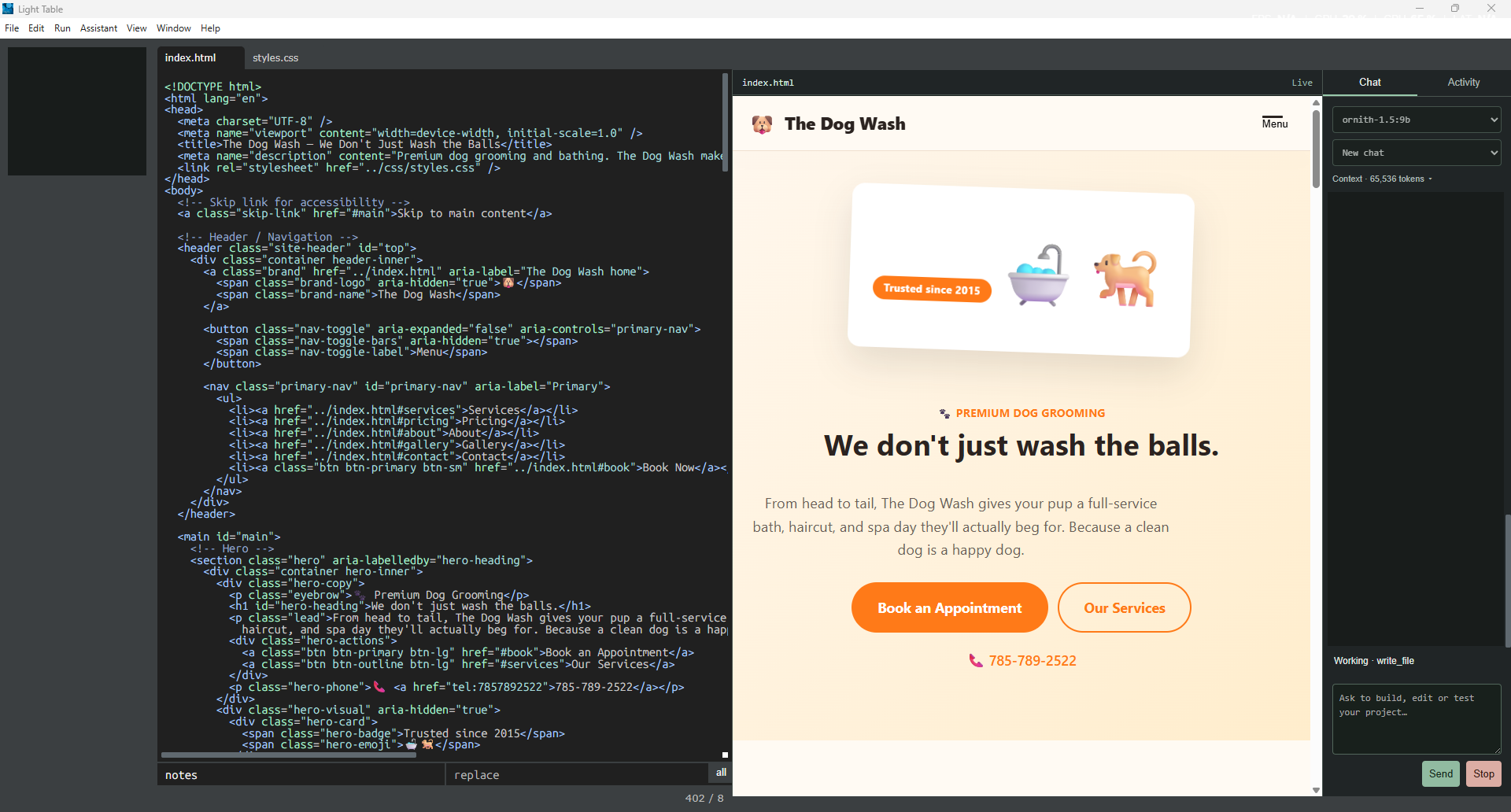
The major new addition to this restoration is an implemented Ollama coding assistant inside Light Table. It sits in a resizable Chat / Activity dock while source files and the running program stay in the main workspace. The original editor, menus, inline watches and source-linked errors remain part of the workflow.
This is more than a text box that produces suggested code. The assistant can read a project, make file changes through the editor, run commands, start an owned development server and inspect the actual native preview. Those abilities also make its permissions important: the current implementation runs with Full Access, using the Windows account's file and terminal permissions.
Connect an Installed Local Model
Start the tested Light Table build using its documented launcher, open a project, then choose Assistant → Chat. Ollama must already be running at http://127.0.0.1:11434 and have a suitable model installed. The model selector lists models discovered from the local service; selecting one saves that choice. If the service was unavailable, start it and choose Assistant → Refresh models.
The integration does not install a model for you, and appearing in the selector does not establish coding or tool-calling reliability. A tool-capable model is needed for the complete project workflow. Use the release's assistant guide for its tested model and prerequisites rather than assuming every installed model behaves alike.
The first request may include a substantial cold load. One recorded 64K-context verification took about 188 seconds to load its model. That is a single observation, not a speed benchmark or a promised startup time. There is no separate warm-up button in the current UI; Stop remains available during model loading as well as generation.
Tell It Which Code Matters
The request includes the active project, selected code, an active-source excerpt, draft buffers and their identities, plus explicitly attached source. Use Attach files or Attach selected code when a particular implementation matters. Reads and searches use unsaved editor buffers when available, so an assistant can work with the code on screen without requiring a silent preliminary Save.
The initial context setting is 65,536 tokens, with model thinking disabled. Click the context count in Chat or choose Assistant → Settings. Presets cover 8K through 256K; exact custom values range from 2,048 to 262,144. Save remembers the setting and sends it on the next request; Cancel keeps the previous saved value. These are requested context sizes, not a guarantee that every model or machine can support the maximum.
Both coding and summarization requests explicitly send the configured context size to Ollama. As a conversation grows, older work is summarized while retaining the goal, latest request, changed files, remaining work and command receipts. Recent complete tool exchanges are retained, and large file reads return continuation positions. Compaction is useful bookkeeping, not a guarantee that a model will reason correctly about every detail.
From a Request to Real File Changes
Enter sends a message; Shift+Enter adds a newline. A run can keep working until it finishes or is stopped, without an overall product duration or tool-call limit. A new message steers the running task between steps. The assistant can create an empty project for scaffolding; the ordinary New project action still provides the existing JavaScript starter.
Existing files must be read before a write, rename or deletion. Changes are journaled, and disk hashes plus canonical document revisions reject stale edits. The tools use the editor's real document and Save behavior; a failed write retains dirty source. Linked and partial views share full-document history and save state.
There is no universal proposal/diff/Approve gate in this Full Access workflow. Requests can lead directly to file edits and commands. Review the changed files and actual results, then use Undo assistant edits for recorded file changes when subsequent user edits can be preserved. Undo does not reverse arbitrary terminal side effects, dependency installation, external service operations or every consequence of a command.
For a first exercise, use a disposable project and give a concrete task: “Read this project, add a small change, run its existing tests, and explain the files changed and any failures.” This is a suggested testing prompt, not a claimed recorded benchmark. Watch the file changes, command receipts and running preview rather than treating a fluent completion message as verification.
Check the Program It Actually Runs
Foreground commands retain their output and real exit codes. Background commands and development servers have explicit ownership. Captured previews can use unsaved buffers; development-server previews use the assistant's actual local connection. Preview tools inspect DOM, console messages, errors and screenshots from the running native view.
That lets the assistant test a result in the same workspace rather than relying only on generated code. Supported classic-function, callback-constant, CSS and compatible markup updates can preserve program state. Other changes restart explicitly. A successful preview is still evidence for that project and interaction, not proof of arbitrary framework compatibility.
Pause, Stop and Recover
Pause prevents new actions at a safe boundary; a foreground command already in progress can finish. Stop aborts generation and terminates assistant-owned commands, servers and private previews. Use the visible Stop button or Ctrl+Alt+.. The draft message is preserved, and the interface shows Stopping while cleanup proceeds.
Manually started programs and the Ollama service retain their ownership. The assistant also pauses when it needs information, after three identical failures without progress, or after repeated unchanged observations. Steering, new observations and actual edits permit progress. Saved conversations and journals are associated with projects; unfinished work recovered after an editor restart is paused, and an unfinished command is not replayed automatically.
Local Inference Has a Specific Boundary
The assistant transport in this build uses loopback HTTP and rejects non-local Ollama endpoints. Model requests therefore go to the local Ollama service. Project context and conversation history are also retained locally by the integration.
That does not make every task offline. Installing packages, fetching models, running project commands, opening network-enabled previews or using a model/service configuration with external dependencies can involve network traffic. Full Access commands retain the account's permissions and can affect paths beyond the project. Model licensing, downloads, electricity and hardware requirements also remain separate from the editor's local inference integration.
Execution limits are resource controls rather than a security sandbox. Local command families and browser renderers have a 1 GiB allowance; the separate local JVM allowance remains. Ollama and its loaded model sit outside those quotas. A large requested context can need substantial additional model memory. Captured previews retain their 15-minute program session, separate from the assistant run's duration.
What the Recorded Checks Establish
The V1 baseline includes deterministic controller checks, actual original-editor tests, a complete editor/runtime regression, a fresh Vite run and the shipped live demo. Separate real-model web and Python projects completed actual tests; the web workflow includes inspected native preview pixels and interrupted recovery. These checks establish implemented behavior in the tested environment, not general model reliability.
Later focused work verifies the visible Stop button, retained draft, complete recent tool results during compaction, paged reads, repeated-observation handling and preview startup errors. The newest context-picker receipt records 50 controller checks and 22 native checks, including a saved 24,576-token custom value that reached the next model request. It is a focused follow-up, distinct from the earlier complete regression.
The completed real-model projects used Ornith 1.5 9B. A separate actual model request completed with num_ctx: 65536, and the local service reported 65,536 allocated context tokens. The custom-setting workflow separately verified 24,576 in the next request. These observations establish that the configured values reached the real transport; they do not establish universal model support, maximum-context performance or consistent coding quality.
When a Session Does Not Behave
No models or connection error: check that Ollama is running on its local port, install a suitable model, and Refresh models. Long first response: allow for cold loading and available memory; use Stop if you need to end it. Stale-edit refusal: let the assistant reread the current document rather than forcing an outdated write.
Repeated reads or failures: the pause is deliberate. Give a clearer goal, new information or an explicit next step before resuming. Model/server error: inspect the reported error, preserve the journaled changes and choose another tested model or resume explicitly. One installed model hit an Ollama runner assertion during validation; the assistant reported it and paused rather than claiming a completed workflow.
Inline autocomplete, MCP integrations and cooperating agents are still future work. Clean-machine testing, packaging and compatibility must be judged against the particular public testing release. This remains an experimental restoration, with upstream credit and known limits intact.
THE PAPER TRAIL
Evidence & Sources
This article describes inspected implementation and separately scoped checkpoints. The unsigned Windows x64 experimental testing release v0.9.0-revival.1 and our restoration source are now public. Runtime workflows require Node 24+ and PowerShell 7+; Java, Python and Ollama are optional for their respective features. Clean-machine certification, hosted CI and a fresh full regression remain pending. This is not a supported or full-parity release. The editorial evidence summary separates the completed V1 baseline from later focused checks. No release certification is claimed.